
CPA Goal: Optimize Your Ad Spend with HilltopAds’ New Feature

In today’s digital marketing landscape, efficiency and optimizing ad spend are crucial. HilltopAds, the ad network we reviewed recently at madcpa.ru/obzor-reklamnoj-seti-hilltopads/, has introduced a new CPA Goal feature designed to improve campaign performance and cut unnecessary costs. In this article we’ll take a detailed look at what CPA Goal is, its advantages, and how to configure it correctly for maximum benefit.
A Brief Introduction to HilltopAds:

HilltopAds is a global ad network that has been delivering high-quality traffic worldwide since 2013. The company offers a variety of ad formats including Pops, In-Page, Video VAST/VPAID, and Banners 300×250, along with multiple pricing models: CPM, CPC, CPA, CPL, and CPI.
HilltopAds supports a wide range of deposit and withdrawal methods including PayPal, credit cards, bank transfers, Paxum, Bitcoin, Tether (USDT), Webmoney, and Capitalist. The minimum deposit is just $50, making the network easy to test.
What Is CPA GOAL?
CPA GOAL is an innovative campaign optimization feature that automatically removes underperforming traffic sources based on a conversion cost you define.
Imagine you’re running a campaign to acquire new app users. You know you’re willing to pay no more than $5 per user. With CPA GOAL, you set that as your target conversion cost. The HilltopAds system analyzes traffic from all sources and automatically disables any where the conversion cost exceeds your limit.
Benefits of CPA GOAL:
- Automatic campaign optimization: CPA GOAL handles the routine work of analyzing and optimizing traffic, freeing up your time for more strategic tasks.
- Budget overspend protection: You set hard limits on conversion cost, ensuring you never spend more than planned.
- Simple and flexible setup: CPA GOAL is easy to configure to your specific needs. You can set a target conversion cost, maximum CPM, and other parameters.
How Does CPA GOAL Work?
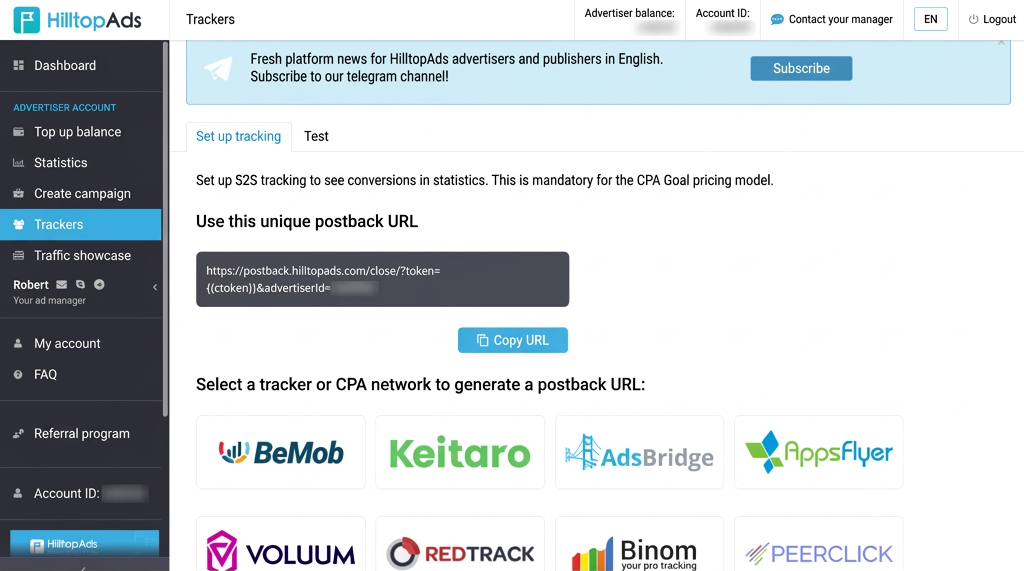
Once CPA GOAL is activated in your campaign, the HilltopAds system starts tracking traffic from all sources. The conversion cost is calculated for each source. If a source’s conversion cost exceeds your set limit, it is automatically disabled. Important: for CPA GOAL to function, postback must be configured for the ad network.
Setting Up CPA GOAL in HilltopAds:
- Register: Sign up with HilltopAds as an advertiser.
- Create a campaign: Go to “Manage Campaign” and click “Add campaign”.
- Choose a format: Select the Popunder format (desktop or mobile).
- Campaign type: Select “CPA GOAL”.
- Configure rules:
- GEO and Prices: Set a target conversion cost for each geo.
- Start optimization: Specify the number of conversions after which optimization kicks in.
- ROI: Set your desired ROI.
- Max CPM: Set your maximum CPM bid.
- Save: Click “Add campaign” to save your settings.
Use promo code MADCPAGOAL and get +20% on your first deposit of $100 or more!
Verdict:

HilltopAds’ CPA GOAL is a powerful tool that can significantly improve the efficiency of your ad campaigns. Automatic optimization, budget overspend protection, and flexible setup make CPA GOAL a genuinely useful feature for advertisers.
We strongly recommend testing HilltopAds and their new feature. If you haven’t worked with the network yet, use promo code “MADCPAGOAL” to get +20% on your first deposit of $100 or more!






Discussion
0