Why Your Facebook Ads Aren’t Getting Impressions (And How to Fix It)
Whether you’re just starting out or you’ve been running traffic for years, you’ve probably hit this wall at least once: your Facebook ads get approved, but impressions and clicks are nowhere to be seen — sometimes for days. So what’s going on?
This usually happens at the launch of a new campaign, whether you’re working with a fresh account or a seasoned one. The ads pass moderation just fine, but nothing moves. The culprit is almost always Facebook’s auction system. Read through these common reasons and bookmark this post — it’ll save you time and money down the road.
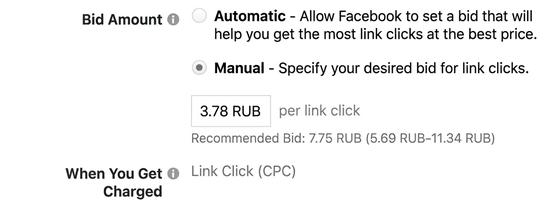
Your Manual Bid Is Too Low
Everybody wants cheap clicks and conversions right out of the gate. But here’s the thing — you have to earn low CPCs, not just set them. When your ad first enters the auction, it’s competing against thousands of others, many of which have already built up strong performance history and locked in favorable positions at low cost.
Setting the lowest possible bid might feel like a smart way to protect your budget, but in practice it prevents your ads from gaining any real traction. Every ad in the auction is evaluated on a combination of factors — content relevance, expected reach, engagement signals, and yes, the price you’re willing to pay. All of these together determine whose ad gets shown.
Facebook’s suggested bid isn’t pulled out of thin air. In fact, at the start of a campaign it can be worth bidding slightly above the suggested amount. And no, that doesn’t mean you’ll keep paying that rate forever. If your creative is solid and resonates with your audience, your CPC will drop naturally — and you’ll have already secured a foothold in the auction. So if you’ve set a manual bid and results are disappointing, either raise the bid or switch to automatic bidding and let Facebook optimize for you.
Your Relevance Score (Quality Ranking) Is Low
This metric has a direct impact on how fast — or how slowly — your ads deliver. Facebook’s relevance score (now broken into Quality Ranking, Engagement Rate Ranking, and Conversion Rate Ranking in Ads Manager) tells you how well your ad resonates with the audience you’re targeting. If people are ignoring your ad or actively hiding it from their feed, your rankings tank fast — and Facebook starts showing your ad less and less, eventually grinding delivery to a halt.
It works similarly to how CTR functions in display ad networks: the better your engagement, the lower you can afford to bid while still winning impressions. It’s a snowball effect — good creative builds momentum, poor creative kills it.
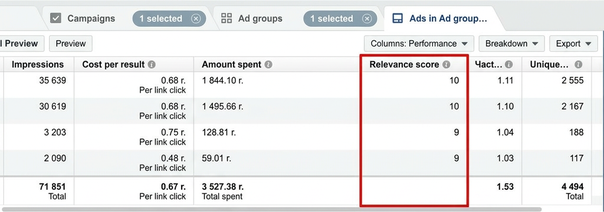
Keep a close eye on this metric. The moment you see it slipping, it’s time to refresh your creatives.
Too Much Text on Your Ad Image
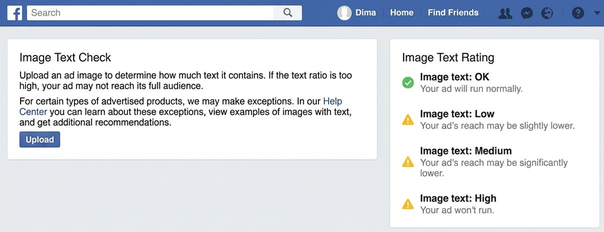
When you’re working with small ad image formats, the temptation is real — squeeze in some punchy text to boost your CTR, right? Unfortunately, Facebook has strict guidelines about this. Images with more than 20% text coverage get penalized with reduced reach or may not deliver at all. Ideally, your ad image should have little to no text.
And it’s not just written text that counts — logos, watermarks, and other graphic elements are included in that 20% calculation too.
There are a few exceptions: video game imagery, product shots where text is part of the product, and event posters. But these are narrow exceptions, and it’s not always easy to qualify.
To avoid guessing whether your image is over the limit, use Facebook’s Text Overlay tool, which will analyze your creative and give you feedback before you submit it for review.
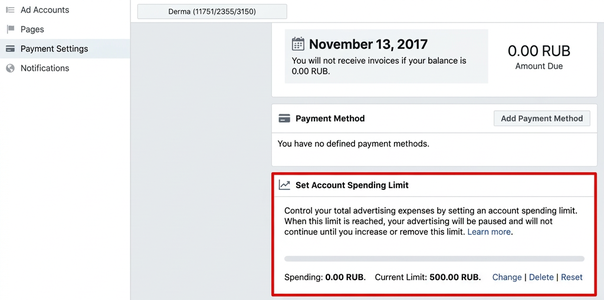
You’ve Hit Your Account Spending Limit
Messaging platforms are the future of marketing!
Follow my Telegram channel so you never miss an update — https://t.me/madcpa!



Discussion
0